
Features Production Tracking
Countertop Production Tracking Software
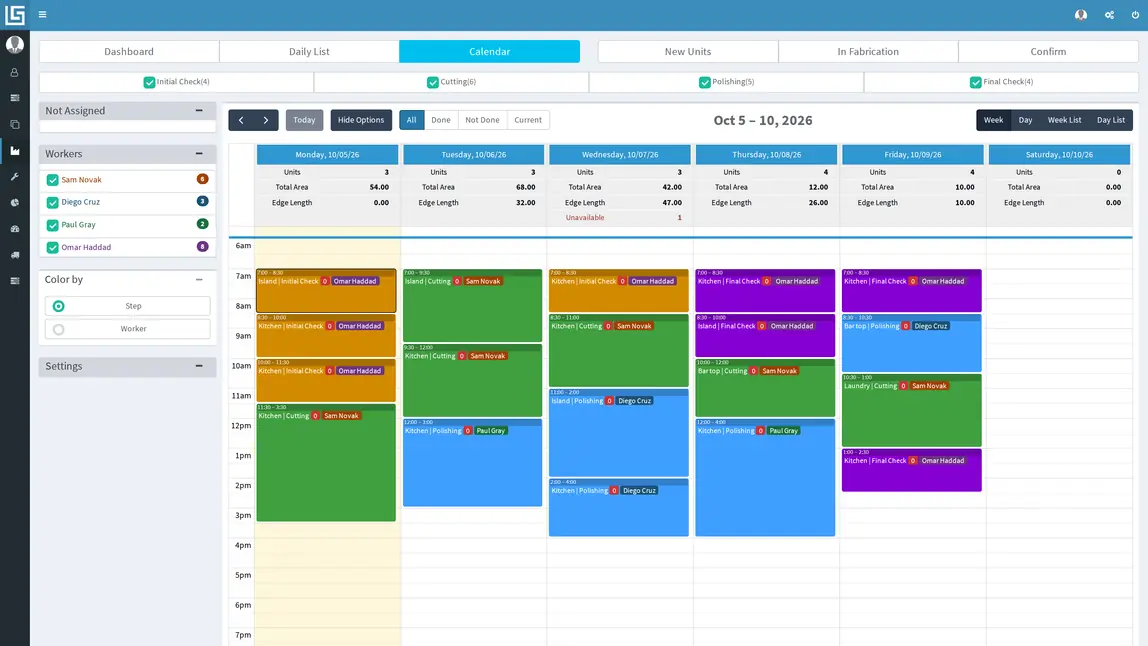
See what the shop is doing today. Countertop fabrication tracking software and countertop production software should make the shop-floor work visible, so Lapisoft plans fabrication steps, assigns the work and follows each unit as it moves through production. A unit is one countertop piece or work area of a job.
Lapisoft is one system for the whole shop.
Fabrication steps
Your steps, your workers
Set up the fabrication steps your shop uses, along with workers and positions.
The default steps are:
- Initial Check
- Cutting
- Polishing
- Final Check
Your shop can configure the process around the work it actually does.
Fabrication calendar
Plan the fabrication
Assign steps to workers and place the work on the fabrication calendar. This countertop production scheduling software keeps fabrication planning separate from the field calendar.
Time-off warnings help the production manager see when a worker is unavailable while planning the shop schedule.
Completion
Done and confirmed
Steps are marked done.
When the required work is complete, the unit is confirmed as fabricated and is ready to schedule for installation.
That production state stays connected to the job.
See countertop job tracking software
The installation is planned on the separate field calendar.
The daily list
Use the daily fabrication list to see the work assigned for the day.
The shop can also print a Fabrication sheet when a paper copy is useful on the floor.
Numbers per step and per worker
Fabrication statistics show area and edge length by step and by worker.
That gives the production manager a record of completed fabrication work using the measurements already attached to the countertops.
The right slab for the unit
Slabs can be allocated directly to jobs and units before fabrication.
Good to know
Questions about production tracking
Is production planning on the same calendar as installs?
No. Fabrication has its own calendar. Templates, installations, pickups and service calls use the field calendar.
Can we use our own fabrication steps?
Yes. Set up the steps your shop uses, with workers and positions. The default steps are Initial Check, Cutting, Polishing and Final Check.
How does the office know a unit is ready to install?
When the steps are done, the unit is confirmed as fabricated. It can then be scheduled for installation on the field calendar.
Can we see how much each worker fabricated?
Yes. Fabrication statistics show area and edge length by step and by worker.
Included in the plan
Production tracking is included
Countertop production tracking is included in the current Premium Plan, with all features and unlimited users at one flat monthly price.
- All features
- Unlimited users
- One flat monthly price
Book a demo
Keep today’s shop work visible
Use countertop fabrication scheduling software to plan the steps, then use the daily list and completion status to see what is moving through the shop.
We reply to demo requests within 1 business day. After the demo, interested shops get a 1-month free trial.