
Countertop Fabrication Software Built for Stone Shops
Lapisoft is countertop software for stone fabricators who want one system from the estimate through installation and payment. It is stone fabrication software built around the way a real shop works.
Real work. Real changes.
Jobs change.
Everything stays connected.
Customer changes, delayed materials and shifting schedules are part of the work. Lapisoft keeps the details together in one place.
-
Contact
Contact from Emily Carter
Job • In Progress -
Estimate
Estimate for the kitchen
Kitchen • Price Confirmed -
Drawing
Kitchen layout drawn
-
Unit added
Emily adds a vanity after the template
Vanity • Fabrication -
Drawing change
Emily wants the sink moved
-
Payment
Deposit paid, balance still open
-
Template
Kevin’s team goes to template
-
Time off
Kevin’s team is off on Friday
-
Installation
Chris’s team takes the vanity install
-
Material change
Emily switches to Calacatta Gold
-
Purchase order
The kitchen slab has not arrived
-
Cutting
Mike cuts the vanity on the bridge saw
-
Polishing
Vanity polishing moves to Thursday

One system for the whole shop
What is inside Lapisoft
Nine parts of one connected system, from the first customer record to the monthly report.
Customers
Keep the account, contacts and job-site addresses together. Set customer types, lead sources, payment terms and customer pricing for stone, edges, sinks and accessories. Notes, documents, balances and statements stay on the account.
Estimates and drawings
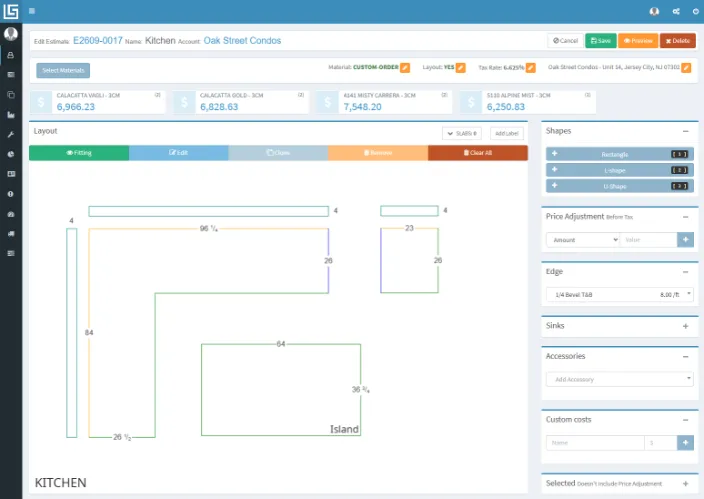
Draw the countertop or enter the measurements. Lapisoft calculates area and edge length and prices material, edges, sinks, cutouts and other costs. When the customer says yes, turn the estimate into the job.
Job tracking
See where every job stands. Each unit, one countertop piece or work area of a job, moves through its own status, so kitchens, vanities, staged work and refabs can be followed separately.
Scheduling
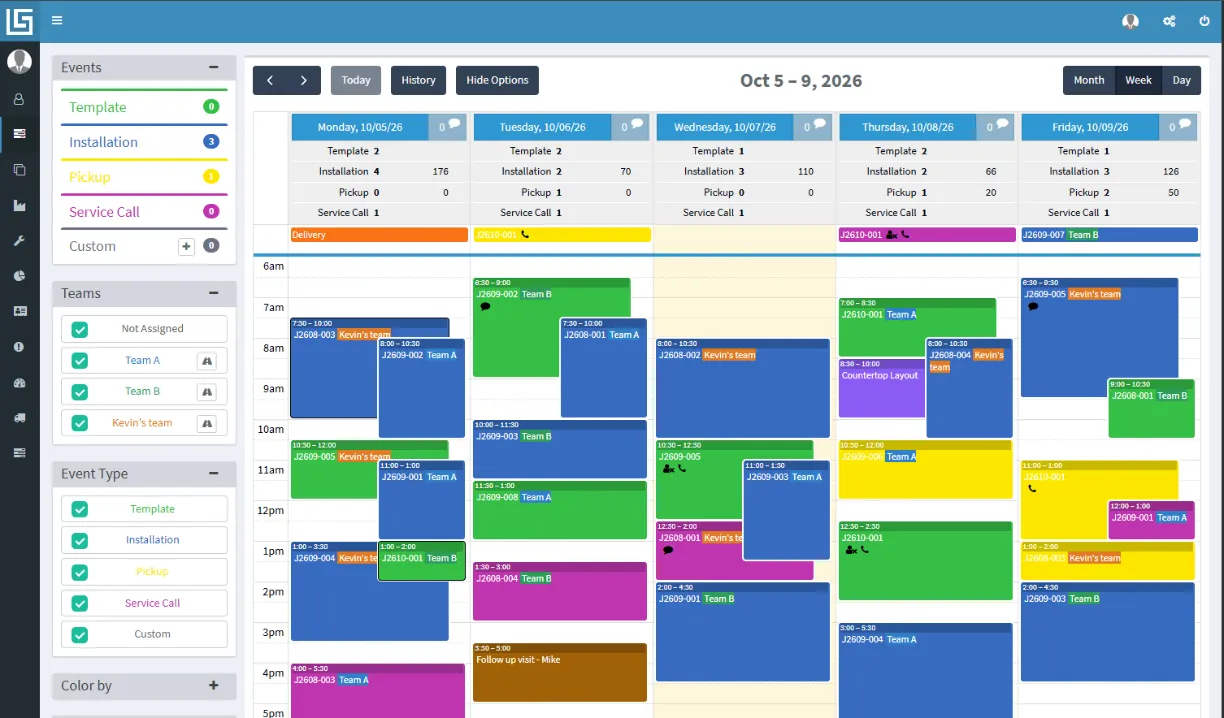
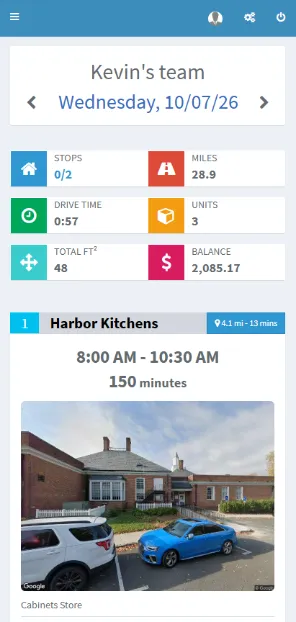
Put templates, installations, pickups and service calls on one shared calendar. Assign teams, see work that still needs a date and review the route for each crew.
Inventory
Know what is in the yard, what is on hold and what is allocated to a customer, job or unit. Track slabs, remnants, consignment material, purchase orders, deliveries and QR labels.
Production tracking
Plan your own fabrication steps, assign them to workers, use the fabrication calendar and the daily list on the shop floor, and confirm each unit when fabrication is complete.
Accounting and QuickBooks
Create invoices from jobs, record payments, print receipts and customer statements, and see unpaid jobs and account balances. When you are ready, send each invoice to QuickBooks Online with one click.
Activity history
Almost every record keeps its change history: who created, edited or moved what, and when. Login history shows who was in the system. Retrace what the team did and find mistakes early.
Reports
Answer practical shop questions: unpaid jobs and account balances, the monthly result, sales by rep, field events, yard stock and fabrication by step and worker. Export lists and reports to Excel and PDF.
Tasks, documents, time off and user permissions are part of the same system.
What changes for the shop
Boost revenue
Money gets lost between the estimate and the payment: an estimate nobody followed up, a change that was never priced, a remnant forgotten in the rack, an invoice sent late. Lapisoft keeps the numbers on the job from the first call to the last payment, so the shop sells what it quoted, invoices on time and collects what it is owed.
- No job falls through the cracks. Every estimate has a status. See which ones have not turned into jobs and follow up before the customer goes elsewhere.
- Every change is priced. After the template, the unit is evaluated and the price confirmed, so a bigger island or an extra sink never leaves the shop for free.
- Material is not wasted. Slabs, remnants and holds are tracked in the yard and allocated to jobs, so a usable remnant is sold on the next vanity instead of sitting in the rack.
- Nothing stays unpaid by accident. Unpaid jobs and account balances in one report. Invoices created from the job and sent to QuickBooks Online with one click.
Increase efficiency
The same job gets typed into a spreadsheet, a calendar and a whiteboard, and the shop floor asks the office what to cut today. Lapisoft enters it once: the estimate becomes the job, the job fills the field calendar and the fabrication calendar, and everyone in the shop sees the same current information.
- Enter once, use everywhere. Customer, drawing, material and price go from the estimate to the job, the schedule and the invoice without retyping.
- The field runs on one calendar. Templates, installs, pickups and service calls by crew, with routes, drive times and the work that still needs a date.
- The shop floor runs on the daily list. Your own fabrication steps, assigned to workers. Each step is marked done and each unit confirmed as fabricated, so nobody waits for an answer.
- You see where the time goes. Fabrication statistics by step and by worker, and a daily summary of money in, money out, fabrication and events.
Ask in plain English
Ask your AI about your shop
Connect Lapisoft to ChatGPT, Claude or Grok and ask questions about your real shop data in plain English.


AI access is read-only. Each person signs in with their own Lapisoft account, sees only what their role allows, and company administrators control who can use the connector.
Unlimited users
One flat price for the whole team
- Owner
- Sales
- Office
- Accounting
- Installers
- Fabricators
- Yard
The current Premium Plan includes all Lapisoft features and unlimited users at one flat monthly price. The owner, office, sales, production and installers can each have their own login without adding a per-user fee.
There is no installation fee. Setup, data import and training are free. The AI connector and QuickBooks Online are included.
Good to know
Questions shop owners ask
What size shop is Lapisoft for?
Countertop shops of all sizes: a small shop where the owner does sales, scheduling and invoicing, or a larger operation with several crews and departments. Everyone works in the same system, and there is no per-user fee.
Does Lapisoft work on phones and tablets?
Yes. Lapisoft runs in a browser on a computer, tablet or phone, and it works the same on each. The office, the shop floor and the installers in the field see the same data. There is no app to install.
Is there a contract?
No. Billing is monthly, with no contract and no minimum term. You can cancel at any time. There is no installation fee either.
Can you help us switch from another system?
Yes. Setup, data import and training are free, and we go through them with you, during or after the trial. What to expect when you come from another system is on the Switching page.
Does Lapisoft work with QuickBooks Online?
Yes. Create the invoice in Lapisoft and send it to QuickBooks Online with one click. Invoices, payments, balances and statements stay in Lapisoft, and your accountant keeps working in QuickBooks.
Can we use our own fabrication steps?
Yes. You define the steps your shop uses, for example Layout, Cutting, Edge and QA, and assign them to workers and machines. Each step is marked done on the shop floor, and each unit is confirmed as fabricated.
Can we control what each employee sees?
Yes. Every user has their own login and a role. Administrators decide what each role can see and do, and the activity history shows who changed what.
What support do we get?
Support by phone, email and remote help, for everyone on the team, not only the owner. Training is free and can happen during or after the trial.
How do we get started?
Book a demo. We reply within 1 business day to schedule it, and the demo usually takes under an hour. After the demo, interested shops get a 1-month free trial.
More questions? Ask them on the demo or write to us.
Book a demo
See how Lapisoft would run your shop
Bring your questions and the way your shop works today. We will show you Lapisoft from estimate to payment.
We reply to demo requests within 1 business day. After the demo, interested shops get a 1-month free trial.