
Features Job Tracking
Countertop Job Tracking Software
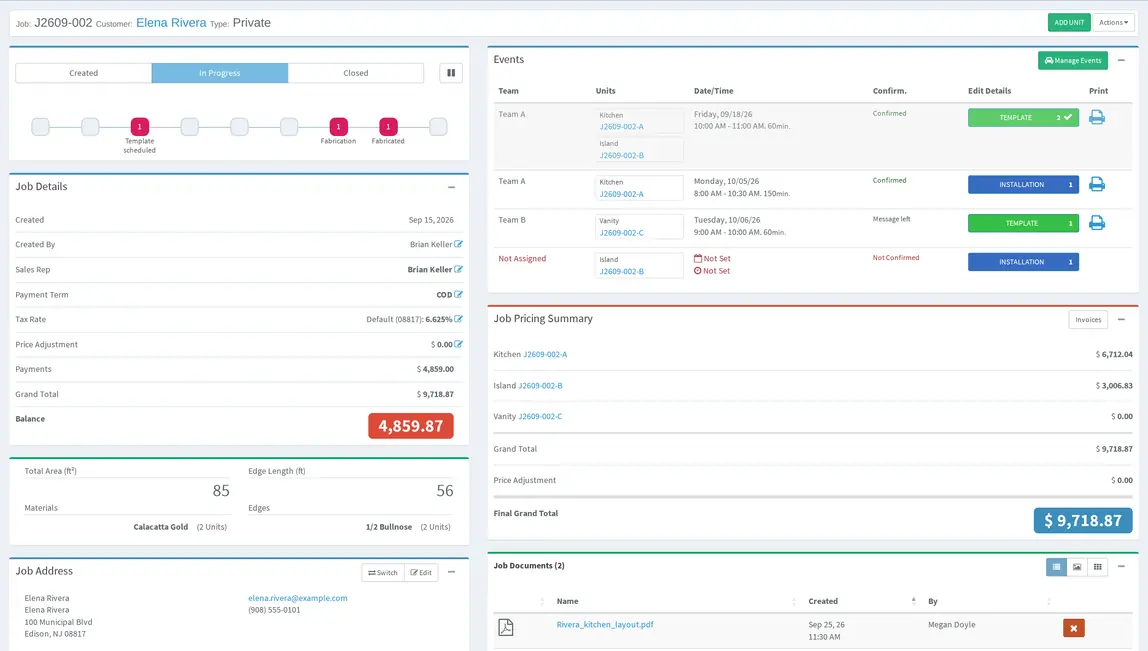
When someone asks “where is this job?”, Lapisoft gives the office and shop the same answer. Countertop job management software and countertop workflow software should show both the job and the work inside it, so Lapisoft tracks each countertop from estimate to fulfilled.
Lapisoft is one system for the whole shop.
Structure
Customer, job site, job and units
Lapisoft keeps the work in a simple structure:
- customer
- job-site address
- job
- units
Stone fabrication job tracking works best when it follows the real shop workflow rather than a generic project-management model.
A unit is one countertop piece or work area of a job.
For example, one job can contain a kitchen and a vanity as separate units. They belong to the same customer and job but can move through the shop at different times.
Units can come from estimates or be created from scratch.
Unit status
A status for every unit
Each unit has its own status. Before the template it moves from Created to Ready for Template and Template scheduled. After the template it moves through Evaluation, Evaluated and Price Confirmed. During shop work it moves through Fabrication and Fabricated. When the installation or pickup is completed, it reaches Fulfilled.
The job itself is kept separate, with statuses Created, In Progress, Closed and Lost.
That makes it possible to see both the overall job and the exact stage of each countertop piece or area.
Job record
One job record for everyone
A job can keep:
- notes
- documents
- photos
- tasks
- slabs
- payments
- events
- change history
Role permissions control what each user can see and do.
Material allocated to the work stays connected to the job and unit.
Invoices, payments and statements are also part of Lapisoft.
After the template
After the template, the unit moves through evaluation and the price is confirmed before fabrication.
Jobs that move in stages
Not every countertop on a job has to move together.
If the kitchen is ready before the vanity, each unit can move through template, fabrication and fulfillment on its own while staying inside one job.
Keep refabs visible
When a piece has to be remade, the unit can be flagged as a refab so the replacement work stays identifiable in the job.
See open work every day
Daily Projects shows the day’s scheduled events, such as templates, installations, pickups and service calls, with details including the assigned team, time, job, units, area, account, address, job value and balance.
Daily Summary brings together money in and out, fabrication and events. Tasks can have assignees, priorities and dates and stay linked to the job, customer or estimate they belong to.
Where the job goes next
Template and installation dates are handled on the field calendar.
See countertop scheduling software
Fabrication steps, workers and the production daily list are handled on the shop-floor side.
Good to know
Questions about job tracking
Is the schedule the same thing as job tracking?
No. The field calendar handles dates and teams. Job tracking shows the job and unit statuses and records. The two are connected.
Can one job have countertops at different stages?
Yes. Each unit, one countertop piece or work area of a job, has its own status. The kitchen can be in fabrication while the vanity still waits for its template, inside the same job.
What happens when a piece has to be remade?
The unit is flagged as a refab, so the replacement work stays visible in the job.
Can we see who changed what on a job?
Yes. Almost every record keeps its change history: who created, edited or moved what, and when.
Included in the plan
Job tracking is included
Countertop job tracking is included in the current Premium Plan, with all features and unlimited users at one flat monthly price.
- All features
- Unlimited users
- One flat monthly price
Book a demo
Keep the whole job visible
See the job, each unit, its status and the records around it without asking several people for the latest update.
We reply to demo requests within 1 business day. After the demo, interested shops get a 1-month free trial.