
Features Estimating and Quoting
Countertop Estimating and Quoting Software
Countertop estimating software and countertop quoting software should do more than print a number. Build the estimate, price the work and move it into the job without starting over. Lapisoft is one system for the whole shop, with all features in one workflow.
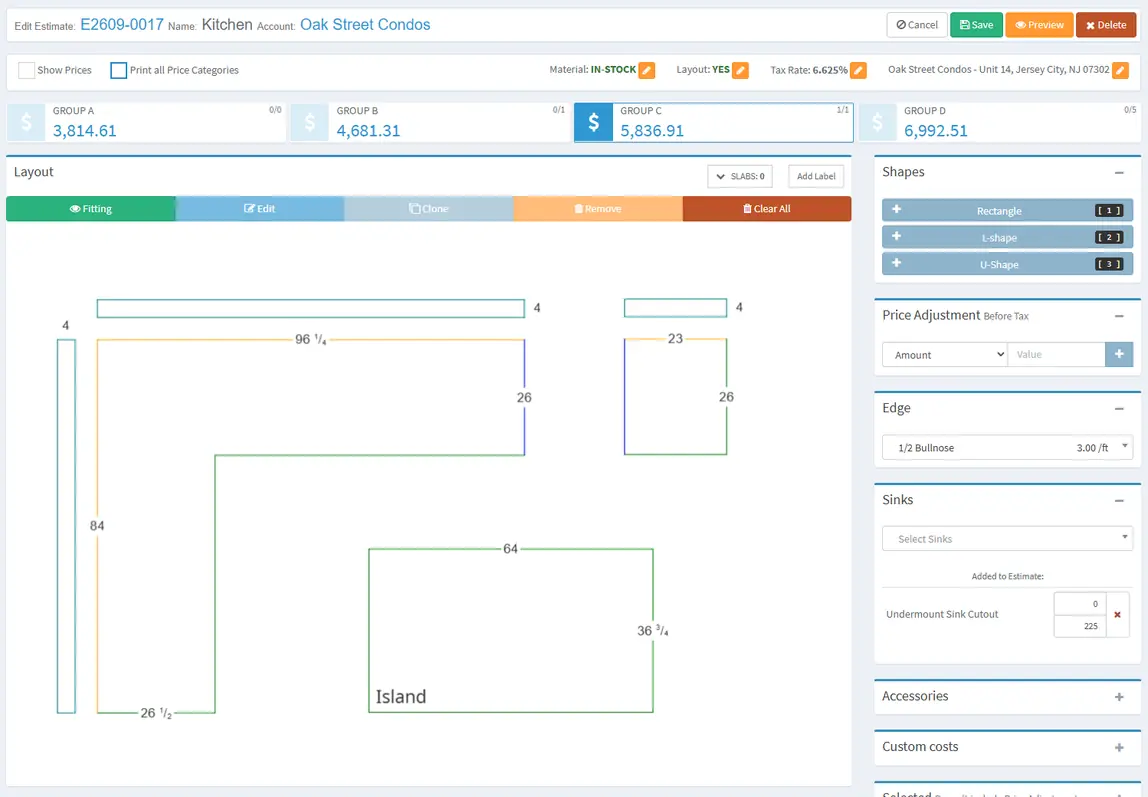
Drawing
Draw the countertop, get the numbers
Use Lapisoft’s countertop drawing software to build the countertop shape. The estimate calculates area, backsplash and edge length from the drawing.
That gives the salesperson the measurements needed for pricing while keeping the drawing with the estimate.
Pricing
Price every part of the job
An estimate can price:
- material
- thickness
- edges
- sinks
- cutouts
- accessories
- custom costs
- adjustments
- tax
The result stays together in one estimate instead of being pieced together from separate worksheets.
Quote several materials from one drawing. Each material option is priced on its own, with separate prices for the material, the slab and the price per square foot, so the customer can compare the options.
Customer pricing
Your prices for each customer
Set prices for stone, edges, sinks and accessories by customer type or for an individual customer. The same estimating workflow can handle different pricing for builders, dealers and retail customers without rebuilding the price list for every quote.
Every kind of estimate
From the yard, from a custom order, or without a drawing at all
In stock or custom order
Create an in-stock estimate from material in your yard, or make a custom-order estimate for material that still needs to be purchased.
The countertop layout software function lets you place slab photos on the estimate drawing by hand so the material can be shown with the countertop pieces.
Need a quick estimate? Skip the drawing
An estimate does not have to start with a drawing. Enter the information directly when the drawing is not needed.
One proposal, ready to print
Clone an existing estimate when a new quote starts from similar work.
A Joint Estimation combines several estimates into one proposal with one total. Estimates can be printed as PDFs, and Print Attachments can add documents such as terms or care guides to the printed package.
One connected job
From estimate to job
When the work moves forward, create the job and its units from the estimates. A unit is one countertop piece or work area of the job.
After the template, the unit is evaluated and the price is confirmed. The estimating information becomes part of the same workflow that continues through fabrication, installation, invoicing and payment.
- Estimate
- Job and its units
- Template
- Evaluated, price confirmed
- Fabrication
- Installation
- Invoice
- Payment
The estimate is the first step. Everything after it lives in the same job.
Good to know
Questions about estimating
Can I make an estimate without a drawing?
Yes. Enter the information directly when the drawing is not needed. The estimate prices the same material, edges, sinks, cutouts, accessories, custom costs, adjustments and tax.
Can builders and retail customers have different prices?
Yes. Set prices for stone, edges, sinks and accessories by customer type or for an individual customer. Builders, dealers and retail customers get their own prices without rebuilding the price list for every quote.
Can I quote several materials from one drawing?
Yes. Draw the countertop once and price it in more than one material. Each option has its own prices for the material, the slab and the price per square foot, so the customer can compare them.
Can several estimates go into one proposal?
Yes. A Joint Estimation combines several estimates into one proposal with one total. It prints as a PDF, and Print Attachments can add documents such as terms or care guides.
Can I use estimating on a tablet?
Yes. Lapisoft runs in a browser on a computer, tablet or phone.
What happens after the customer says yes?
Create the job and its units from the estimates. After the template, the unit is evaluated and the price is confirmed, and the same job continues through fabrication, installation, invoicing and payment.
Included in the plan
Estimating is included in the full Lapisoft system
Countertop estimating and quoting is included in the current Premium Plan, with all features and unlimited users at one flat monthly price.
- All features
- Unlimited users
- One flat monthly price
Book a demo
Want to see how your shop would build an estimate?
We reply to demo requests within 1 business day. After the demo, interested shops get a 1-month free trial.